

A market you don’t sell to in its own language will usually tell you before you decide to enter it. Traffic from that country grows, support tickets arrive in another language, and the conversion rate there sits well below your home market. At that point the question is no longer whether to translate, but how far to go.
That is the difference between translation and website localization. Translation changes the words. Localization changes everything the words sit in: currency, formats, payment methods, visuals, legal copy, and the way search engines find the page.
This article covers what website localization involves, how to choose an approach, and the steps to run the project without rebuilding your site twice.
Article Highlights:
- Website translation is one part of website localization. The rest is adapting content, formats, and visuals so the experience feels native rather than converted.
- The approach you choose – proxy, CMS connector, or repository-based – determines your URL structure, your SEO setup, and how much developer time the project needs. Choose it before you translate a single string.
- AI makes localization faster and cheaper at scale, but only where content is unambiguous. Knowing where it fails is what keeps quality predictable.
What is website localization?
Website localization is the process of adapting a website to a specific market’s language and culture. Localization involves text translation and adaptation of currency, date formats, images, and payment options. The main goal is to provide the best user experience for each target market.
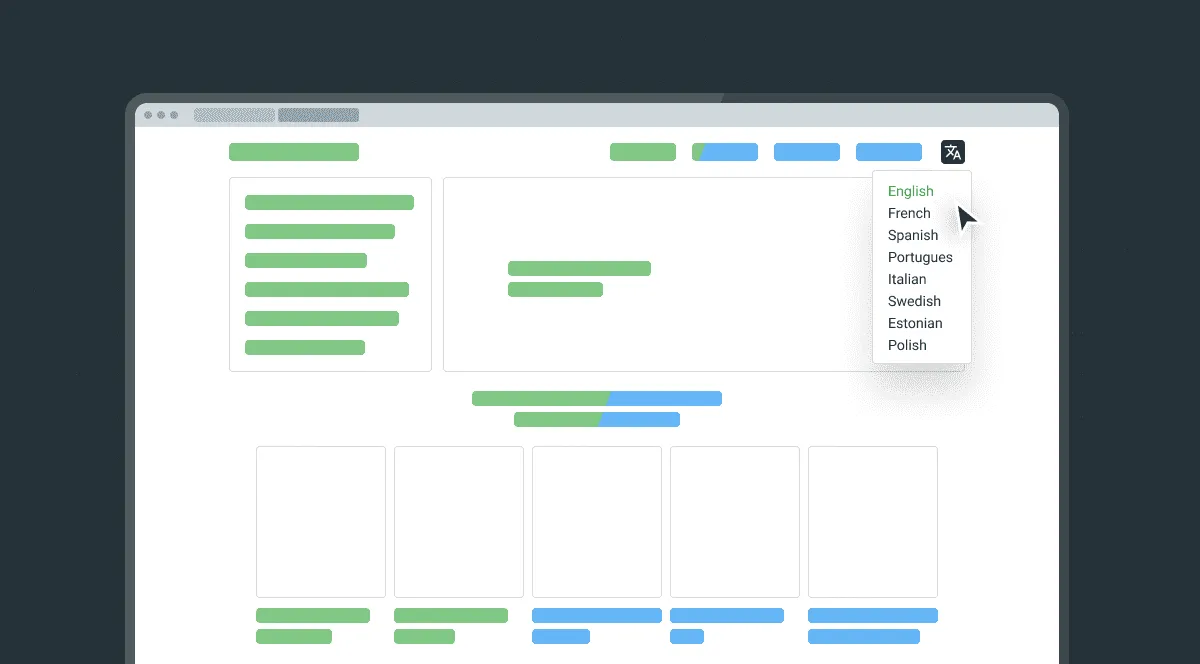
In practice, a localized site differs from a translated one in details users notice immediately: prices in local currency with local formatting, addresses and phone fields that accept local formats, dates that don’t read as the wrong month, payment methods people actually use, and legal pages that match local requirements.
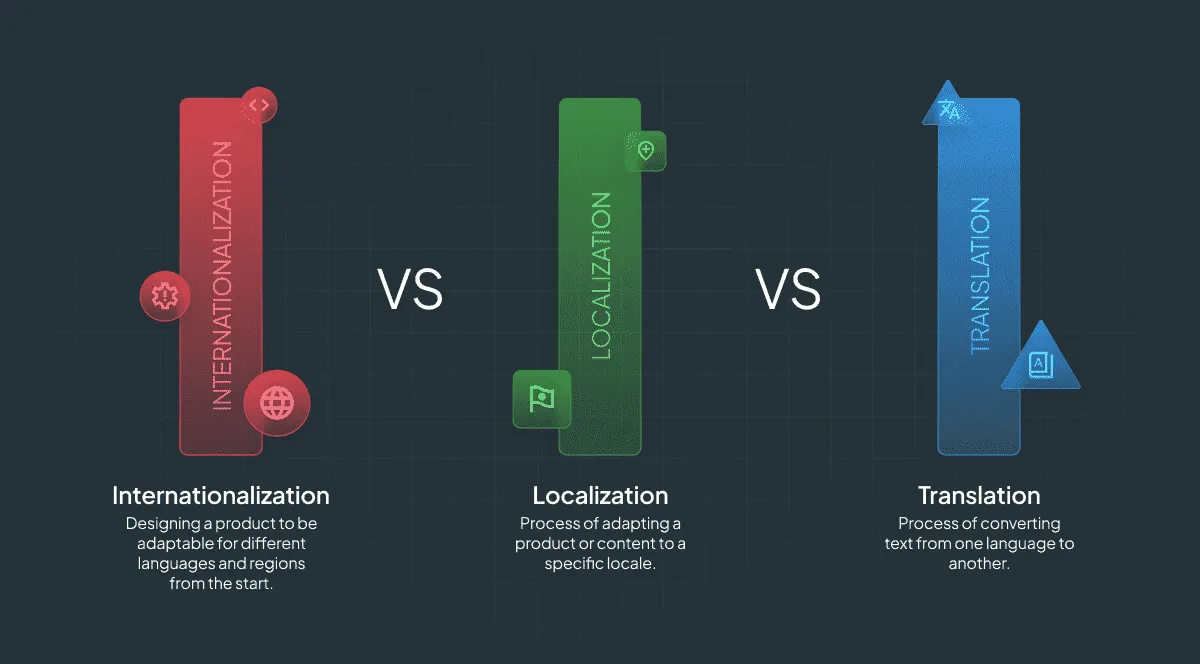
Localization vs. translation vs. internationalization
Translation focuses on converting text from one language to another. Localization adapts the entire user experience to meet the expectations of a specific market.
Internationalization (i18n) is the engineering work that makes localization possible without rebuilding the site for every language. Concretely, it means:
- Separating user-facing text from code, into resource files rather than hardcoded strings
- Leaving room for text expansion – German and Finnish commonly run 30% longer than English, and layouts break when they don’t have that room
- Supporting right-to-left layouts if Arabic or Hebrew are on your roadmap
- Handling date, time, number, and currency formats through locale settings rather than hardcoded patterns
- Handling pluralization rules, which differ per language and can’t be solved with a single “s”
Skip internationalization and every new language becomes a separate engineering project. Do it once and adding a locale becomes a content task.
Benefits of website localization
You might be wondering, “Why not just use Google Translate?”. Raw machine output is usually good enough for a user to understand a page, and rarely good enough for them to trust it with a payment. With business translation done properly, companies see gains in three areas.
Improved user experience
Users who can read a page in their own language spend less effort on every step of it: understanding the offer, filling the form, choosing the payment method. Friction removed at each step shows up as lower bounce rates and fewer abandoned checkouts.
The effect is strongest where the stakes are highest – pricing pages, checkout flows, legal terms, and support content. Those are also the pages where a bad translation costs the most, which is why prioritization matters more than coverage.
More attractive product appeal
Localization allows for tailored messaging that increases trust among local customers. That comes from:
- Offering region-specific preferred payment methods
- Incorporating local cultural nuances
- Adapting to local languages and the target region differences
Improved SEO ranking
Web content localization opens up search demand you currently can’t compete for. Local users search with local terms, and those terms are rarely a direct translation of your English keywords. A page that ranks for “translation software” in English may need an entirely different target phrase to rank in German.
Is it time to localize your website?
Determining the right time to localize your website is crucial for maximizing the impact of your efforts. Let’s go over the main signals:
- One clear indicator is when you start seeing a high volume of international traffic. If a large part of your website visitors are from foreign regions, it’s a strong signal. Localization could improve their experience and increase engagement.
- Another trigger is market saturation. Take notice if your target market is becoming saturated and growth has plateaued. In such cases, expanding into new markets through localization opens up new revenue streams.
- Competitor behavior – your direct competitors are going multilingual. It’s essential to keep up to maintain a competitive advantage.
- Frequent support requests from international users. It showcases the necessity of localized content to better serve your local and global audience.
- A product that travels well. Software, digital services, and most e-commerce categories work in any market. Products tied to a specific place, regulation, or supply chain don’t.
When not to localize yet
Localization multiplies whatever you already have, including the problems. Hold off if:
- You can’t support the market. Localized pages generate localized questions. If nobody on your team answers in that language, you’ve created a worse experience, not a better one.
- You can’t transact there. No local payment methods, no legal entity where one is required, no shipping – translation won’t fix any of it.
- The source content isn’t stable. Localizing a page you’ll rewrite next quarter means paying for the same words twice.
- You haven’t found product-market fit at home. A message that doesn’t convert in your own language rarely converts better in another one.
A narrow launch – your highest-intent pages in one language, done properly – beats a full site in five languages that nobody maintains.
8 steps to localize a website
Localizing an existing website involves several critical steps. This ensures the process is comprehensive and effective.
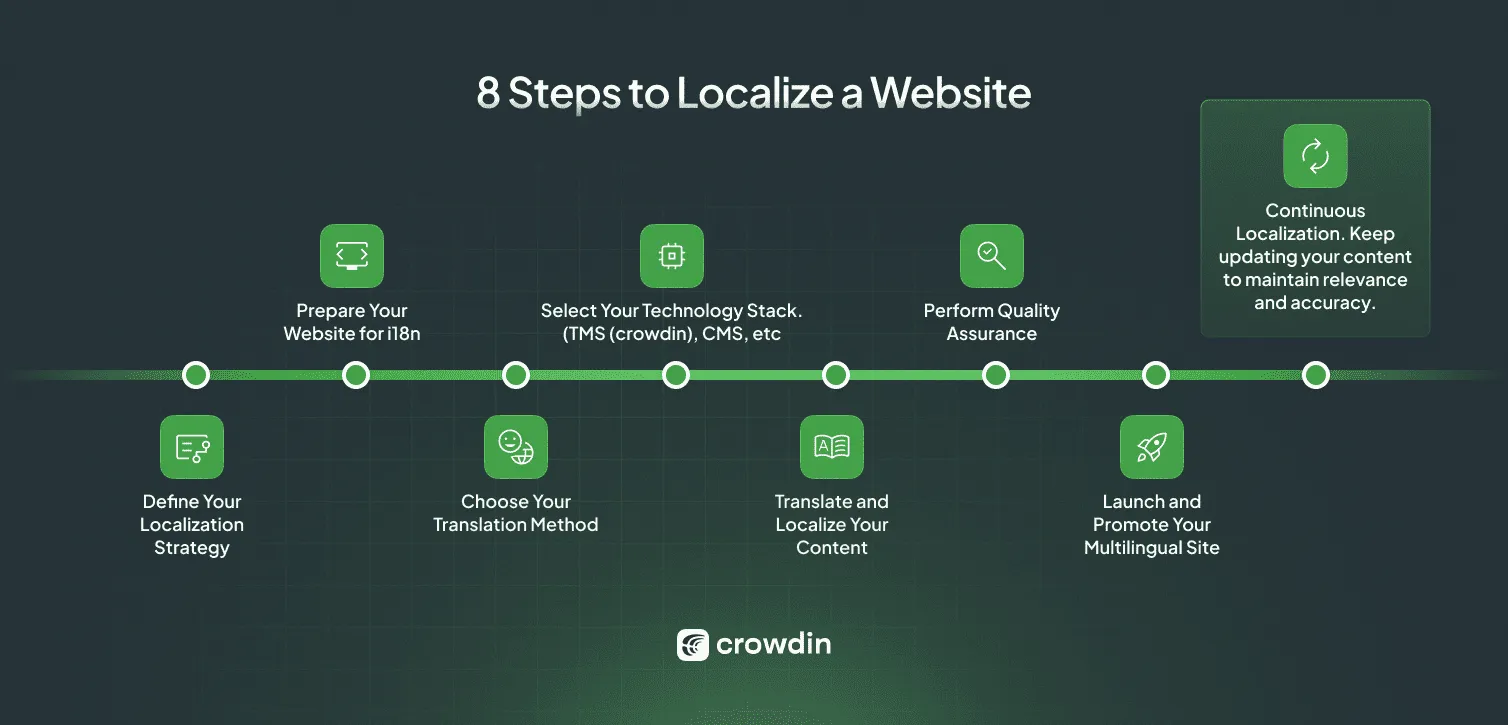
- Define your localization strategy. Start by identifying your target markets, then rank content by priority. Not every page deserves a translation, and the pages closest to revenue usually deserve human review.
- Prepare your website for internationalization (i18n). Extract hardcoded strings into resource files, replace fixed date and number formats with locale-aware ones, check your layouts against 30% longer text, and decide how language is expressed in your URLs. This step consumes the most engineering time in the whole project, and skipping it is what forces teams to redo the work later.
- Choose your localization approach. Proxy, CMS connector, or repository-based – see the comparison below. This decision shapes everything after it.
- Choose your translation method:
- In-house translators
- Freelancers
- Language Service Providers (LSPs)
- AI translation with human post-editing
- Hybrid approach
- Translate and localize your content. For e-commerce websites, this step also includes localizing product descriptions, payment methods, and customer service options. Since modern websites function like apps, apply software localization best practices to your code structure, using the tooling that matches your stack, such as WordPress or Next.js.
- Perform in-depth quality assurance (QA). Conduct thorough testing to ensure translation accuracy and functionality.
- Launch and promote your multilingual site. Focus on SEO by adapting meta descriptions, titles, and keywords to rank in local search engines, and make sure the localized pages are actually indexable.
- Continuous localization. Keep updating your content so translations don’t drift away from the source.
Choosing your localization approach
There are three ways to get translated content onto a live website. They differ in who does the work, what you control, and what you pay for.
| Approach | How it works | Best for | Trade-offs |
|---|---|---|---|
| Proxy | A layer sits between your site and the visitor, detects source text, and serves translations without touching your codebase | Marketing sites, landing pages, and site builders like Webflow, Squarespace, Tilda, or Framer | Traffic runs through a CDN, which is billed by usage. Dynamic content, pop-ups, and pages behind a login need client-side scanning to be picked up |
| CMS connector | Content syncs from your CMS to your localization platform and back, and the CMS serves the localized pages | Content teams whose pages already live in a CMS with multilingual support | Depends on your CMS handling locales, URLs, and hreflang well. In some platforms multilingual capability is a paid add-on |
| Repository-based | Strings live in resource files in your repo and sync through a CLI or CI integration | App-like sites and frameworks where developers own routing and rendering | Requires internationalization to be done first, and developer involvement for every step |
Most teams end up combining them: a connector or repository setup for the product, and a proxy for the marketing pages that ship faster than engineering cycles allow.
Choosing the right localization solutions
Utilizing a Translation Management System (TMS) is a must. It helps enhance collaboration and project management in website localization, keeps translation memory and glossaries in one place, and automates the repetitive parts of the workflow.
Automation tools like Crowdin offer integrations with design and development software. Such tools also include translation QA checks to ensure the quality and consistency of translations, and help teams build repeatable localization workflows instead of one-off projects.
Creating a Localization Workflow
Two common approaches to localization workflows are the waterfall and continuous (agile) methods. The waterfall approach is the more structured option with set deadlines and limited changes along the way.
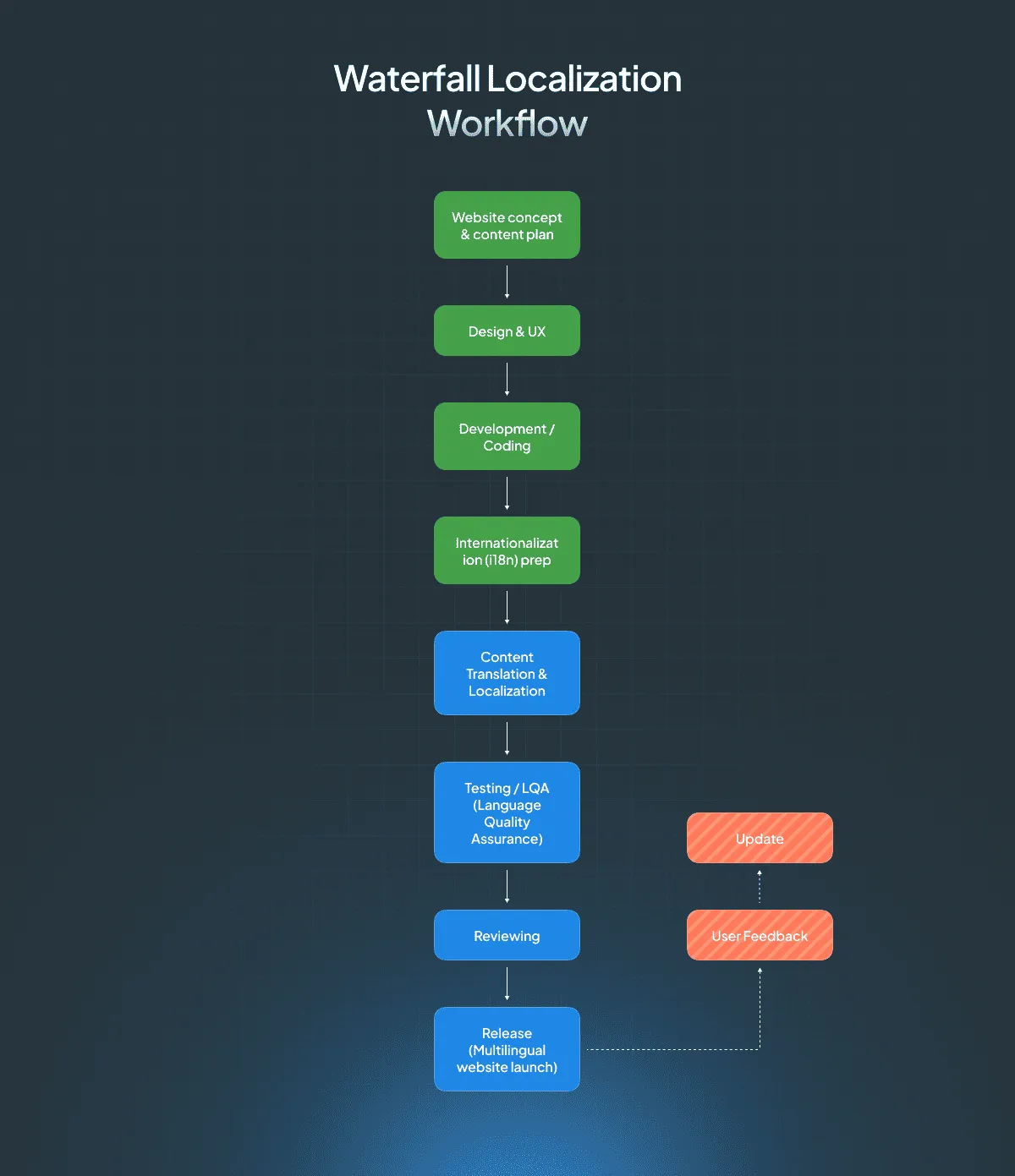
The agile approach is best suited for constant ongoing updates; it is a continuous process rather than a set-and-done project.
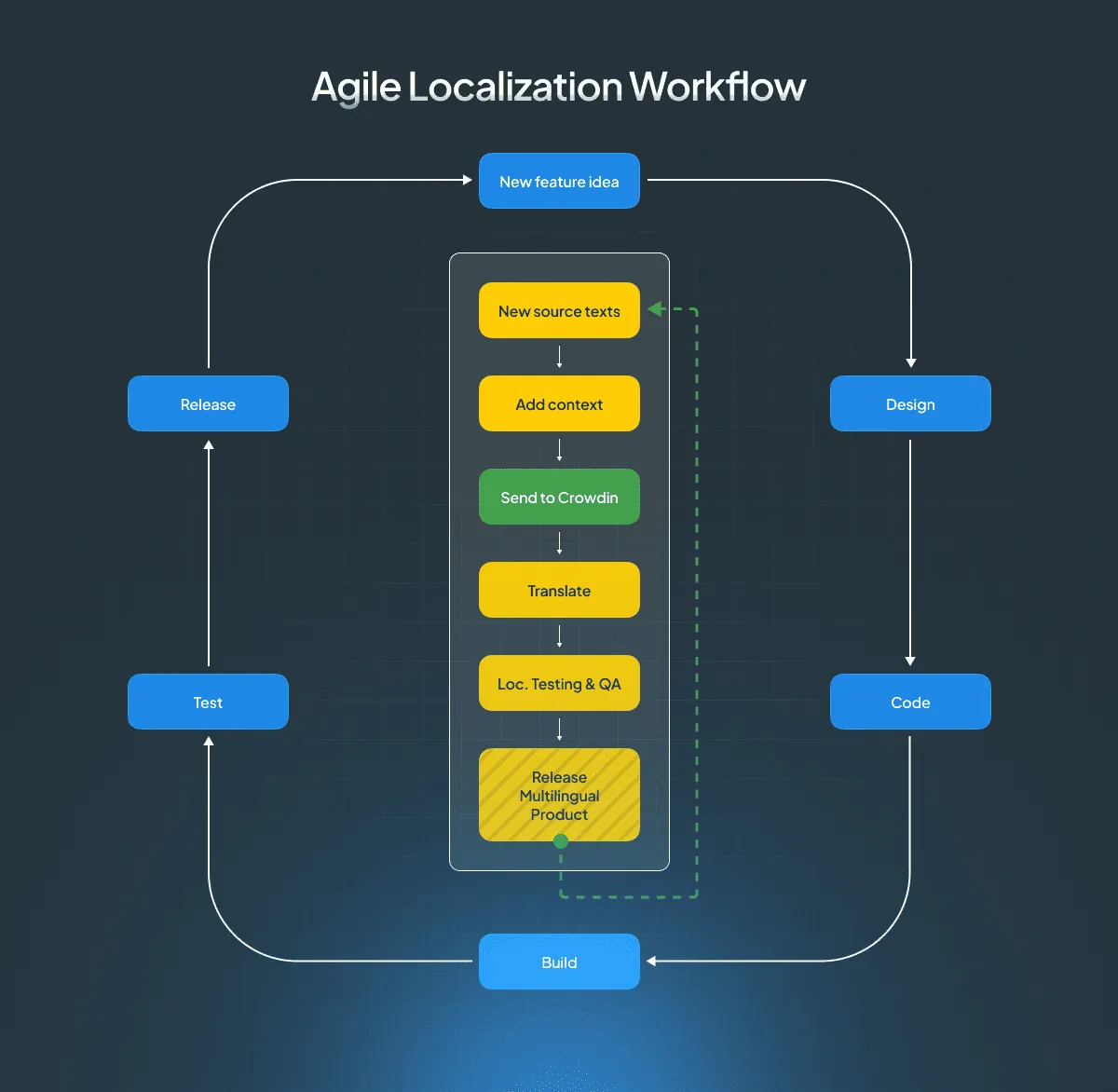
For a product site or a web application, the full chain runs through design and code:
Design
- Screens and interface copy are drafted in Figma
- Strings go to translation from the design stage, so language isn't an afterthought once the layout is fixed
Development
- Text is extracted from code into resource files
- Layouts are checked against text expansion, RTL, and locale-aware formats
Content
- Marketing and help content is written in the CMS to be translatable
- Source text is finalized before it enters translation, so the same words aren't paid for twice
Translation
- Translation memory, glossary, and string context feed every translator and every AI workflow
- Automated workflows handle the long tail, human review covers what carries revenue or legal risk
QA
- Functional checks: formats, forms, switcher, nothing truncated or overflowing
- Linguistic checks: native reviewers confirm tone, terminology, and cultural fit
Launch
- Localized pages publish with hreflang, canonicals, and sitemaps verified
- In an agile workflow the chain loops back here, so new content re-enters translation automatically
For a marketing site there is usually no Figma or Git stage at all – content goes straight from the CMS or the page builder into translation and back. This is exactly why the proxy approach exists, and why marketing teams can ship a new locale without waiting for a release cycle.
Successful website localization requires the involvement of several key stakeholders:
- Developers – internationalization, integration, deployment of localized pages
- Product managers – scope, priorities, release timing
- Copywriters – source content written to be translatable
- Marketers – keyword research per market, local campaigns, measurement
- Professional translators – the translation and cultural adaptation itself
- QA specialists – functional and linguistic checks before launch
The friction between these roles is predictable: marketing wants a locale live this week, engineering has it in next quarter’s backlog, and translators receive strings with no context and no deadline. Agreeing who owns each stage – and how content reaches the translators – prevents most of it.
SEO and keyword research
A localized site that search engines can’t interpret correctly gets the cost of localization without the traffic. SEO localization covers three technical decisions and one content decision.
International URL structures
There are three ways to express language and region in your URLs:
- Subdirectories (
example.com/de/) share domain authority with the main site. Easiest to manage and usually the most efficient for SEO. - Subdomains (
de.example.com) are treated as largely separate sites by search engines. They allow strong regional targeting but need more effort to build authority for each version. - Country-code domains (
example.de) give the strongest geographic signal and the clearest local trust, at the cost of maintaining separate domains and building authority from zero for each one.
For most businesses, subdirectories are the right default. Subdomains suit large enterprises with independent regional teams. Country-code domains make sense when a market is a strategic priority in itself, not just another language.
Decide this before you translate anything: changing URL structure after launch means a migration, and migrations lose traffic.
Hreflang annotations
Hreflang tells search engines which version of a page to serve to which audience. Four rules cover most implementations:
- Every version links to every version, including itself. A page that lists its alternates but omits its own URL is a common and silent failure.
- Links must be reciprocal. If the German page points to the French one, the French one has to point back.
- Use correct codes – language only (
de), or language plus region (de-AT) when you genuinely serve different content per region. - Add
x-defaultfor the page users land on when no version matches their settings, typically your language selector or your primary version.
Hreflang can live in the page <head>, in your XML sitemap, or in HTTP headers. Pick one method and stay consistent – mixing them is where errors hide.
Sitemaps and indexation
Whether you publish one sitemap with all language versions or a separate sitemap per language, reference them in robots.txt and keep them current.
One check matters more than the rest, and most teams skip it: confirm that your translations are visible to crawlers. If translated text is injected in the browser rather than rendered server-side, verify what Google actually sees using URL Inspection and the rendered HTML, not just what you see on the page. This is the single most common reason a localized site gets no organic traffic despite being fully translated.
Canonicalization & duplicate content
The rule is simpler than it’s usually described: each localized page is canonical to itself. A German page’s canonical tag points to the German URL, not to the English original. Pointing every locale at the source version tells search engines to ignore all of them.
Pair self-referencing canonicals with hreflang, and duplicate content across languages stops being a concern.
Language switching
Don’t redirect users automatically by IP. A visitor in Germany may want the English page, and a crawler in the US will only ever see the US version. Offer a visible language switcher, remember the choice, and if you want to suggest a locale, use a dismissible banner instead of a forced redirect.
Testing and launching your localized website
Testing a localized site covers two things that fail in different ways: whether it works, and whether it reads correctly.
Functional testing verifies that region-specific formats display correctly, that forms accept local input, that the language switcher works on every template, and that nothing overflows or truncates when text expands.
Linguistic testing assesses whether translations read naturally to native speakers, follow your glossary and style guide, and carry the right tone for the market. Native reviewers catch what automated checks can’t.
Pre-launch checklist
- All target-locale pages render without layout breaks or truncated text
- Text expansion checked on the longest strings, not the average ones
- Dates, times, numbers, currencies, and addresses display in local formats
- Forms accept local phone, postal code, and address formats
- Language switcher present and working on every template, including error pages
- No automatic IP-based redirects
- Hreflang annotations complete, reciprocal, self-referencing, with
x-default - Canonical tags self-referencing per locale
- Translated meta titles and descriptions – translated, not auto-generated
- Localized URLs and slugs where your structure supports them
- Sitemaps updated and referenced in
robots.txt - Translations confirmed visible in rendered HTML
- Images with embedded text localized, alt text translated
- Legal pages, cookie notices, and consent flows reviewed against local requirements
- Native-speaker review completed on revenue-critical pages
- Analytics configured to report per locale before launch, not after
Measuring success and optimizing
Absolute numbers from a new locale tell you very little – a market with a tenth of your home traffic will produce a tenth of everything. What matters is how each locale performs relative to your home-market baseline.
Key metrics and KPIs
- Conversion rate per locale vs. home market. The clearest signal of whether localization worked. A locale converting far below baseline usually points to a specific broken step, not to a bad market.
- Organic traffic and rankings per locale, tracked against locally researched keywords rather than translated ones.
- Support ticket volume per locale, normalized by traffic. A spike after launch usually means a translation problem, not a product problem.
- Time from source publication to translated publication. The practical measure of whether your workflow is continuous or just labelled that way.
- Revenue per locale, read alongside acquisition spend in that market – growth in sales can come from campaigns rather than from localization, so isolate the two before claiming the win.
Customer satisfaction surveys in localized regions add the qualitative layer these numbers can’t provide.
Continuous improvement
Localized content decays: the source page changes, terminology shifts, the style guide is updated, and translations quietly fall out of sync.
Two mechanisms keep it from drifting:
- Feedback from real users. A widget on your live site lets native speakers flag awkward wording where they encounter it. Crowdin’s Website Proofreader app does this – suggestions from visitors sync straight back to your project for review, turning your audience into a distributed proofreading layer.
- Feedback from your own data. When your glossary or style guide changes, existing translations that no longer comply need to be found. Crowdin surfaces these as advisor suggestions rather than leaving you to audit manually, and Crowdin Dreams analyzes how translators edit AI output to propose glossary terms and style rules you haven’t written down yet.
Localization industry best practices
We have compiled a list of what to do and what not to do when localizing your website.
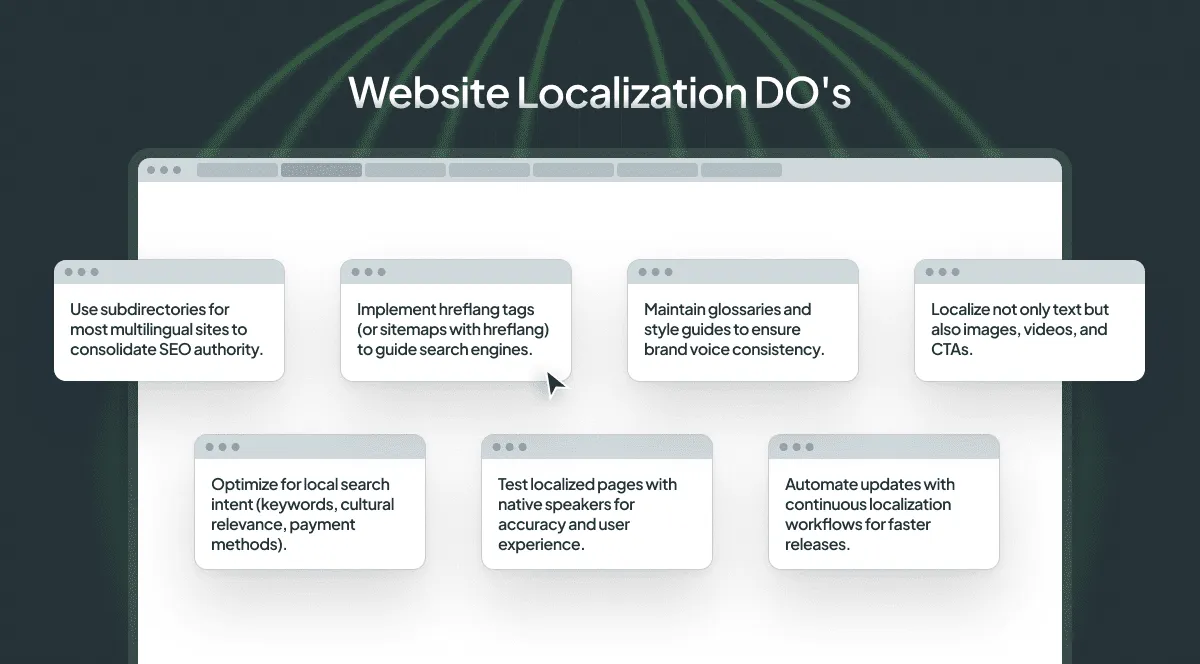
- Use subdirectories unless you have a specific reason for subdomains or country-code domains.
- Implement hreflang correctly – reciprocal, self-referencing, with
x-default. - Maintain glossaries and style guides to ensure brand voice consistency.
- Localize not only text but also images, videos, alt text, and CTAs.
- Research keywords per market instead of translating your existing ones.
- Test localized pages with native speakers before launch.
- Automate updates with continuous localization workflows for faster releases.
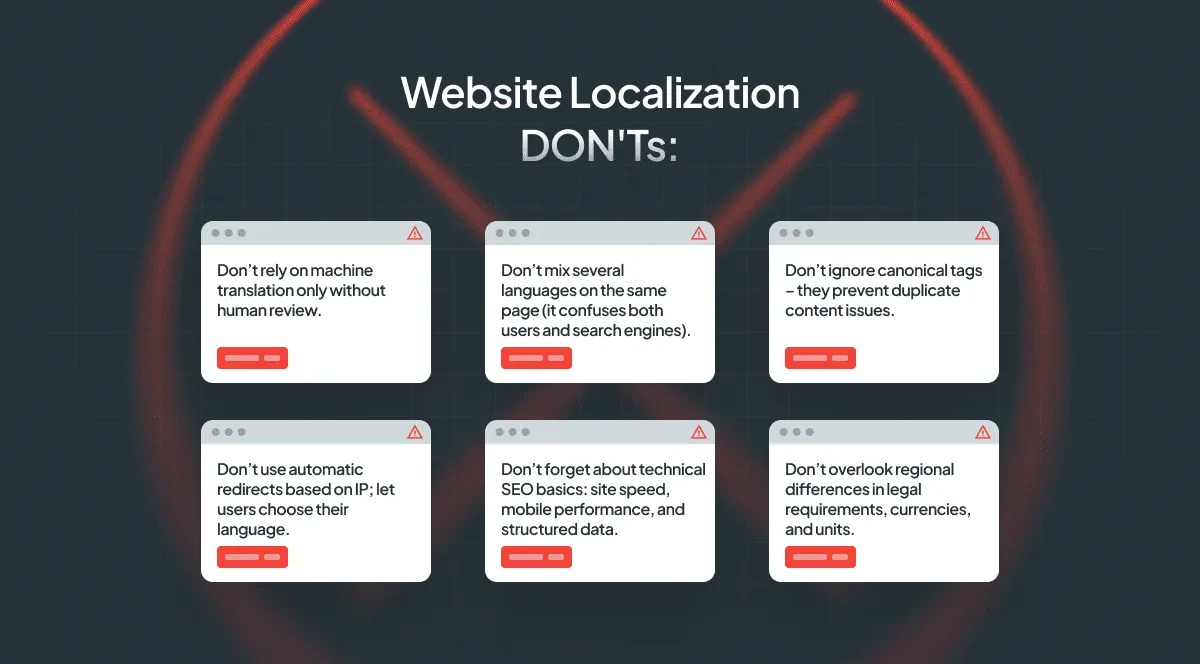
- Don’t rely on machine translation alone without human review on pages that carry revenue or legal risk.
- Don’t mix several languages on the same page.
- Don’t point localized canonical tags at the source-language page.
- Don’t use automatic redirects based on IP; let users choose their language.
- Don’t forget technical SEO basics: site speed, mobile performance, and structured data.
- Don’t overlook regional differences in legal requirements, currencies, and units.
Budgeting for localization and ROI framework
Localization budgets fail in the same way twice: the translation cost is estimated accurately, and everything around it isn’t.
Estimating localization costs
Translation itself is usually priced one of three ways:
- Per word, the standard for human translation and post-editing, with discounts for translation memory matches. The more repetitive your content, the more this reduces over time.
- Per page or per project, common for agencies handling a fixed scope.
- By platform subscription, priced on hosted words or seats rather than on volume translated.
The costs that get missed:
- Ongoing translation, not just the initial batch. A site that publishes weekly will translate more in its second year than in its first.
- CDN traffic, if you use a proxy approach. It’s billed by usage and scales with the success of the locale.
- AI usage. Per-token costs are small individually and easy to lose track of across a team. Spending limits at organization and user level, plus a log of what each AI call cost and which action triggered it, turn this from a surprise into a line item.
- Engineering time for internationalization, usually the largest single cost in year one and the one most often left out of the estimate.
- Linguistic QA and review cycles, which scale with the number of locales, not with word count.
- Design and layout adjustments for text expansion and localized images.
Calculating ROI
Compare the total cost of a locale against what that locale generates, over a realistic window – organic traffic takes months to build, so a quarterly read will understate it. The metrics that make the case:
- Increased localized traffic
- Conversion rate per locale relative to your baseline
- Improved engagement on localized pages
- Reduced support load in that language
AI in website localization
AI has changed the economics of website localization: content that was never worth translating – long-tail documentation, product catalogs, help articles – now is. What hasn’t changed is where the technology reaches its limits.
Where AI performs well: high-volume content with stable terminology and low ambiguity. Documentation, release notes, support articles, product descriptions, and repeated interface copy. With translation memory and a glossary feeding it, output is consistent in a way human teams struggle to match at scale.
Where it doesn’t: short strings without context, where a single word can be a button, a heading, or a status. Marketing copy that depends on tone, wordplay, or cultural reference. Legal and regulatory text where an error carries real cost. And any content where being subtly wrong is worse than being obviously wrong – which is most of what users read before paying you.
The practical conclusion isn’t “use AI” or “don’t”. It’s to route content by risk: automated workflows for the long tail, human review where mistakes are expensive, and enough context in the system that the AI isn’t guessing in the first place.

AI-powered translation tools
AI-powered localization tools reduce the time between content being published and being available in another language, and keep terminology consistent across thousands of strings – provided the rules are written down somewhere the tools can read.
Crowdin integrates with leading AI providers including OpenAI, Gemini, Claude, and Grok, so teams can use the model their organization has already approved.

Crowdin’s AI tools include:
- Context Enrichment with AI Agents: your AI coding agent analyzes the codebase to describe where each string appears, then writes those descriptions back to your project through Crowdin CLI and Crowdin Skills. Both human and AI translators stop guessing what a phrase refers to.
- Crowdin Copilot: a conversational assistant that handles complex project tasks on instruction – including building a glossary from a source you point it at, such as your own website URL.
- AI Pipeline: a multi-step workflow that runs context preparation, translation, and quality checks in sequence rather than in a single pass. Start from a preset – translation only, translation with adherence and QA checks, or a thorough run that adds file-level consistency – and assign a different model to each step, so a faster one handles preparation and a stronger one handles translation and review. Ambiguous strings can be filtered out for manual attention instead of being guessed at.
How to solve context gap in website localization
The limitation described above – AI failing on short strings without context – has a direct solution: give it the context. The same applies to human translators, who see the same isolated content blocks.
To solve this, Crowdin created 2 apps: one designed for human linguists and one optimized for AI-driven workflows.
| Tool | Primary User | Context Type | Mechanism | Key Benefit |
|---|---|---|---|---|
| Website Context Viewer | Linguist | Visual, Live Page | Renders the live web page directly inside the Crowdin Editor via URL. | Provides visual context for high-quality translation, especially for short strings. |
| Website Context Extractor | AI | Textual, Automated | Crawls your site to locate strings and attaches descriptive metadata. | Helps AI models better understand context for more accurate auto-translation. |
For human reviewers: Website Context Viewer
This app is the solution for blind translations. Instead of guessing if a word is a button, a header, or a metadata tag, linguists can see the actual live website while they work.
When a project manager or an integration (like the WPML Companion or CMS connectors) passes URL information to Crowdin, Website Context Viewer displays the webpage side-by-side with the editor. This allows linguists to see exactly where and how their text appears on the page.
Note: This app works with any context source. For headless CMS integrations, your engineering team must map content blocks to their corresponding URLs during file upload.
For AI workflows: Website Context Extractor
Website Context Extractor automates context for AI workflows. A crawler locates where each text string appears across your site, then generates and attaches textual context descriptions to the strings. It runs on demand or automatically through webhook mode, and you can review the extracted context before it’s saved.
Such context reduces the risk of AI hallucination and improves translation accuracy.
Post-launch strategies
Continuous localization means new and updated content enters the translation workflow automatically instead of waiting for someone to notice it. In practice that means:
- New source content is detected and synced without manual handoffs
- Translations publish on a schedule rather than in batches
- Engagement and satisfaction data per locale feed back into what gets improved next
Monitoring user feedback
Users in a market will tell you what a QA pass missed – if you give them somewhere to say it. Surveys reveal satisfaction with localized content, on-page feedback catches specific wording problems, and support tickets show where the translation actively confused someone.
Regular updates and maintenance
Schedule content reviews per locale rather than waiting for complaints. Terminology shifts, product names change, and legal requirements are updated – and a page that was accurate at launch quietly stops being accurate a year later.
Conclusion: start your website localization today
The projects that work follow the same order: decide whether the market is ready for you, choose the approach before translating, do the internationalization work once, prioritize the pages closest to revenue, and set up measurement per locale before launch rather than after.
Crowdin’s tools cover the part after that decision – syncing content from wherever it lives, running AI and human workflows side by side, keeping terminology consistent, and publishing updates continuously. Request a demo or start a free 14-day trial to see how it fits your stack.
Localize your website with Crowdin
FAQ
What is website localization?
Website localization is the process of adapting a website to a specific target market’s language, cultural norms, and technical requirements. This goes beyond simple translation by tailoring every aspect of the site: language, visuals, currency, date and number formats, payment options, and local references.
How do I know if it’s time to localize my website?
Localize when the demand is already visible: a growing share of traffic from a market you don’t serve in its language, support requests from users outside your country, or a plateau in your home market while competitors go multilingual. Hold off if you can’t support or transact in that market yet.
Should I use a proxy, a CMS connector, or localize in my repository?
A proxy suits marketing sites and site builders, and needs no code changes. A CMS connector suits teams whose content already lives in a CMS with multilingual support. A repository-based setup suits app-like sites where developers own routing and rendering. The choice determines your URL structure, your SEO setup, and how much developer time the project takes.
How can I measure the success of my localization?
Compare each locale against your home-market baseline rather than tracking absolute numbers:
- conversion rate per locale
- organic traffic per locale
- support ticket volume per locale
- lag between publishing source content and publishing its translation
Where does AI work well in website localization, and where does it not?
AI handles high-volume, low-ambiguity content well: documentation, product descriptions, help articles, and repeated interface copy. It struggles with short strings without context, culturally loaded marketing copy, humor, and anything with legal exposure. Those need human review regardless of how good the model is.
How can I ensure brand voice consistency across ten different languages?
Maintain a glossary and a style guide per language, and keep them in the same platform your translators and AI workflows use, so both follow the same rules. Terminology checks and QA checks then flag deviations before publishing.
Do I need to localize my website’s images and videos?
Yes. Text embedded in images, screenshots of a localized interface, alt text, and video subtitles all affect both user experience and search visibility in the target market.
What is the best website localization software for an enterprise?
Look for AI and human translation workflows in one place, connectors to the systems where your content already lives, glossaries and style guides for brand consistency, role-based access, and automation for continuous updates. Crowdin Enterprise covers these and is also available through the AWS Marketplace.

Yuliia Makarenko
Yuliia Makarenko is a marketing specialist with over a decade of experience, and she’s all about creating content that readers will love. She’s a pro at using her skills in SEO, research, and data analysis to write useful content. When she’s not diving into content creation, you can find her reading a good thriller, practicing some yoga, or simply enjoying playtime with her little one.